The goal of the remote freezer monitoring program is to support UCSF’s valuable research by providing FREE remote temperature monitoring sensors to all UCSF research labs with unmonitored -80 freezers. The purpose is to provide researchers with a tool for managing their equipment so that they can make timely decisions in response to potentially urgent situations that might impact research. Note that this is a remote monitoring program, and not a monitoring service. Labs are responsible for monitoring their equipment. Facilities covers the cost of the hardware and software and ensures compliance with UCSF IT.
How the program works
Facilities Research Support Services manages the hardware, software, and network connectivity for remote monitoring. Software and hardware were approved for use by UCSF IT. Facilities covers the cost of gateways, annual software licensing fees, and sensors for unmonitored -80 freezers. Labs determine temperature notification thresholds, escalation path membership, and notification intervals. Facilities programs the sensors and notification alerts and prepares the sensor installation kit for delivery via inter-office mail.
To learn more about the program, please click here.
HARDWARE/SOFTWARE
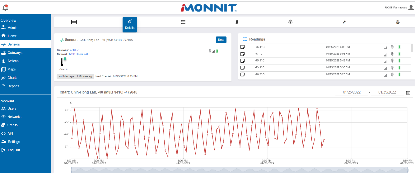
The remote monitoring program uses iMonnit software in conjunction with Power Over Ethernet (POE) gateways and battery-operated low temperature sensors.
PROGRAM AVAILABLITY
The program is available at all UCSF Campus facilities in Mission Bay, Parnassus, Mount Zion, Pride Hall, Hunters Point, Oyster Point, and other outlying areas.
SUPPORT FOR OTHER TYPES OF EQUIPMENT
Facilities Research Support Services has the ability to assist with sensors for other types of equipment, such as refrigerators, liquid nitrogen cylinders, -20 freezers, animal holding rooms, etc. Installation kits are provided at cost, which is approximately $250. This is a one-time equipment cost and there is no charge for software. Simply provide a chart of accounts when submitting your work order.
ADDITIONAL SENSOR OPTIONS
Monnit manufactures a wide range of sensors, including water detection, vibration, and current sensors. If you need assistance with a special type of sensor, our Monnit representative can advise you and Facilities Research Support Services can help with adding the sensor to your user profile. No need to purchase a separate license agreement.
HOW TO REQUEST A SENSOR
- Submit a work order through the Customer Service Center online
- We will send you an intake form so that we may gather information about your equipment and how you’d like alerts and escalation paths to be configured.
- See FAQ section for additional information on escalation path considerations.
- Your sensor installation kit will be sent by inter-office mail, along with written and video instructions. Installation takes about 10 minutes.
LAB RESPONSIBILITIES
Please note that this is a monitoring program, not a monitoring service. Labs are responsible for:
- Installing sensors upon receipt of the installation kit.
- Actively monitoring their sensors through iMonnit and notifying Facilities Research Support Services of any hardware issues.
- Ensuring the list of users on the escalation path is current and accurate, and that there are at least 2 lab members on the escalation paths.
- Submitting work orders for programming changes to users, notifications, or escalation paths.
- Acknowledging alerts.
- Replacing sensor batteries.
- Notifying Facilities Research Support Services if the lab is relocating so that the sensors can be remapped.
- Removing sensors before equipment is sent to salvage. Notifying Facilities Research Support Services if the sensor will be moved to a different freezer. Returning sensors if the lab is leaving UCSF.
Freezer Monitoring Information guide