- Register for the Lactation Accommodation Program: https://tiny.ucsf.edu/UCSFpump
- Wait to receive a confirmation email from the Lactation Accommodation Program
- Connect to UCSFwpa network, or have access to UCSF VPN: https://it.ucsf.edu/services/vpn
- Visit MyAccess: https://myaccess.ucsf.edu/landing and select Event Management Systems
- Select “Create A Reservation” on the left side toolbar
- Locate: “Lactation Room Reservation Form” and click Book Now (to the right)
- Edit the date you wish to reserve
- Adjust time
- Select “Add/Remove”. A list of lactation rooms with come up.
- Select the lactation room location you are reserving and click “Update Location”
- Click “recurrence” next to the date. This window will appear:
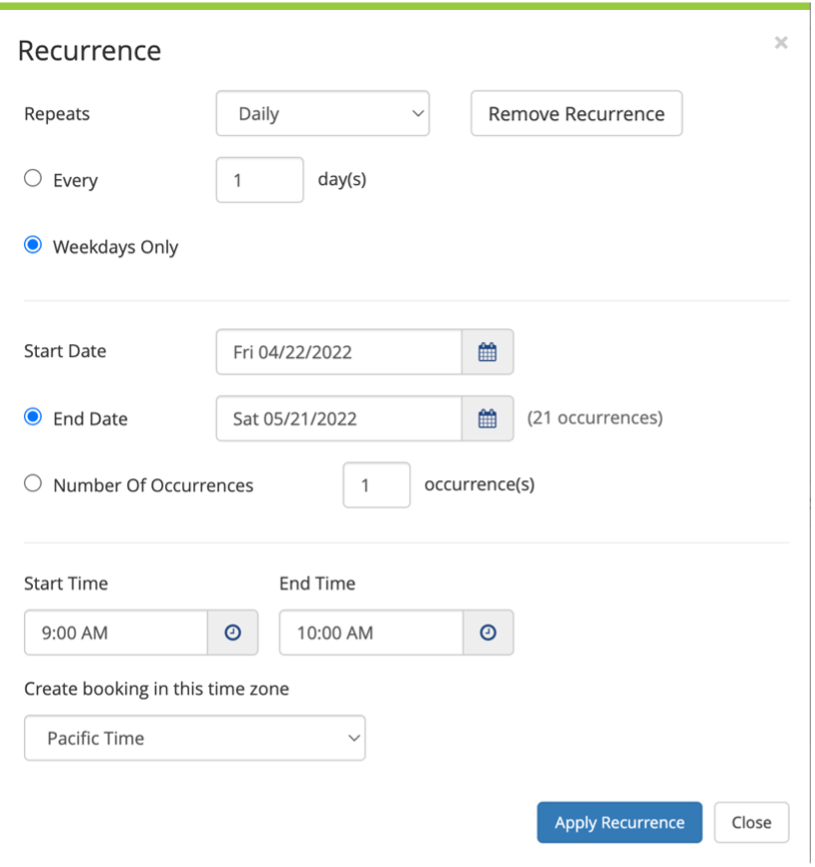
12. Edit 'everyday' or 'weekday'
13. Select a start date and end date (up to 28 days in advance)
14. Check the time & then click "apply recurrence"
15. Click “Next Step” on the upper right-hand side of the page
16. Complete Reservation Details page & check box “I have read and agree to the Terms and Conditions”
17. Click “Create Reservation” on the right.
18. You can review your reservations by clicking “My Events” on the left side toolbar.
19. To delete your reservation, select “My Events” and click “Lactation Rooms” next to the reservation. Edit or delete by selecting the red negative circle.
Learn how to create recurring lactation room reservations