Who is eligible for a Clipper BayPass?
UCSF is continuing to pilot this program with a limited group of employees. The second year of the pilot will extend from January 1, 2025 – December 31, 2025. The employees participating in the pilot program represent a cross-section of UCSF employees including all UAW-represented bargaining unit employees based upon a negotiated contractual commitment and a group of non-represented Campus and Health employees. We wanted to ensure a good cross section of employees to collect data to inform future transit offerings. All eligible employees will be eligible throughout the pilot period.
Do I need to pay for the Clipper BayPass?
There is currently no cost to eligible employees to participate in this one-year pilot program. UCSF is covering the cost of the BayPass during the pilot program for eligible employees. If you do not currently have a Clipper card, you will need to obtain a digital or physical Clipper card, which costs up to $3. After the pilot, and if BayPass continues as a program offered to employers like UCSF in the future, there may be a co-payment for employees.
If I leave UCSF, will I be able to keep the BayPass?
You do not need to return any Clipper cards to UCSF; however, you will no longer receive the Clipper BayPass unlimited transit access after you leave UCSF. Your Clipper BayPass transit benefits will end when you are no longer an employee.
Does the Clipper BayPass work on all transit operators?
Clipper BayPass provides unlimited trips on all bus, rail, and ferry services in the 9-county Bay Area that accept Clipper, except for the historic San Francisco Cable Cars. Parking, Baywheels and BikeLink are also not included. You must tap your Clipper card (either physical or digital) on the card readers to activate the pass every time you ride.
Should I cancel my Pre-Tax transit deductions or any automatic contributions to my Clipper card?
We recommend modifying or canceling pre-tax transit deductions and/or stopping future automatic contributions of other transit passes. See this webpage for more information on modifying for pre-tax benefit account.
Do I need to tap my Clipper BayPass card on the card readers for transit?
Yes. When riding a transit service with the Clipper BayPass, you must tap your Clipper card on a card reader when entering a station or boarding a vehicle to receive the transit benefit. You must also tap off on services like Caltrain and Golden Gate buses that require users to tap off at the end of trips. Failure to do so is a failure to pay and may result in a fine.
What should I do if my BayPass card isn’t working at a faregate or Clipper reader?
Please be prepared with alternative payment if the BayPass isn’t working. If you have a cash amount on your Clipper Card and your BayPass isn’t working for any reason, you can use the cash value to ride while the problem is being troubleshooted. You may receive a citation if you board with a BayPass card that isn’t working. UCSF will not be responsible for any citations. Please take note of key details (i.e., date & time, location, error message) and submit a ServiceNow ticket to troubleshoot the issue. If the Clipper card itself is not working, please check the tips on the Clipper website. If the card on your phone is not working, please call Clipper customer service: 877-878-8883.
When will the Clipper BayPass be ready to use? 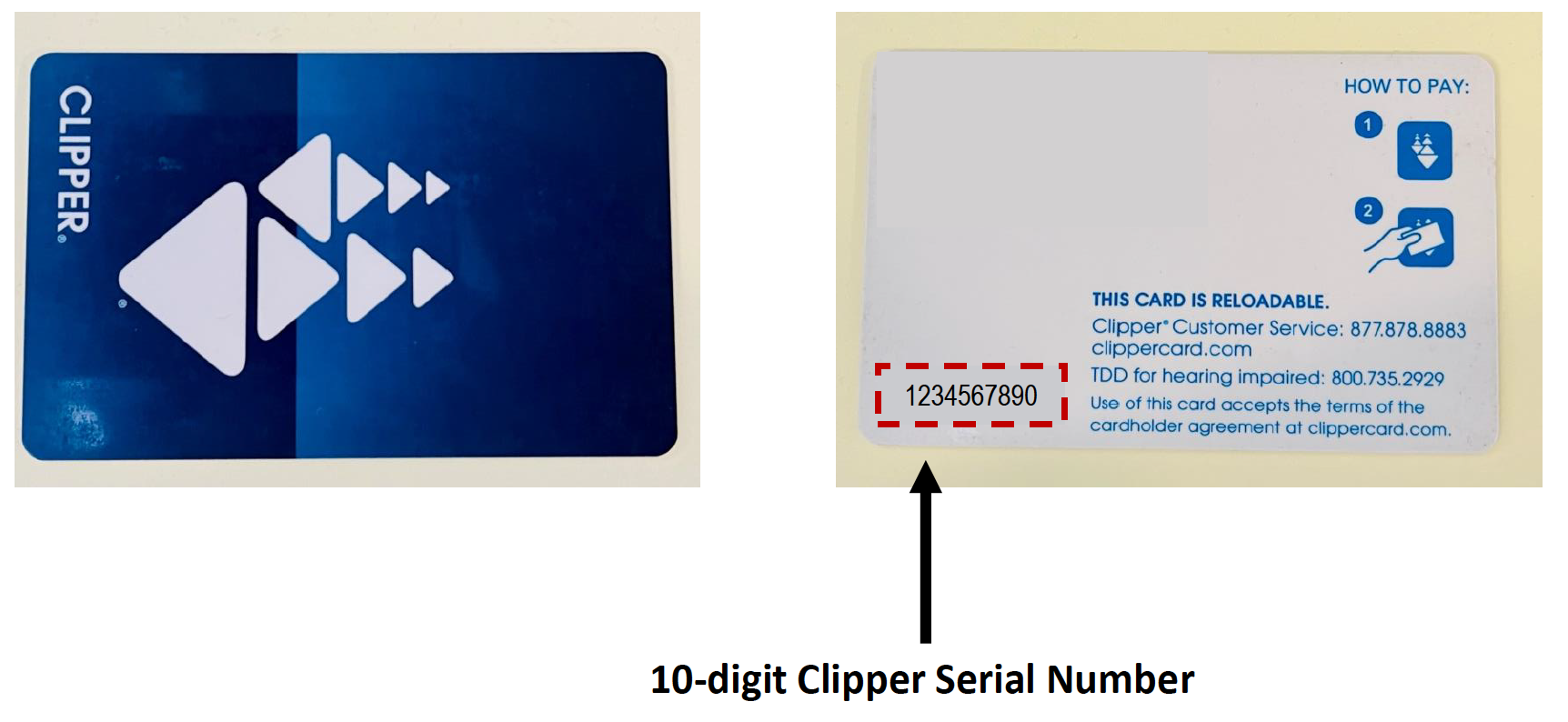
For newly eligible employees who enroll their Clipper cards by December 13, the BayPass will be ready to use January 1, 2025. Eligible pilot participants who submit their Clipper card serial numbers after December 13, will be added on a regular basis, starting in January 2025.
The BayPass is ready to use up to 48 hours - 7 days after a linked Clipper Card number is added to the BayPass portal. You must tap your Clipper Card at a fare reader to officially load the BayPass on your Clipper card. Once the BayPass is loaded to your Clipper Card, it will work at all locations.
*Tip from Clipper: If possible, we recommend tapping your card at a physical transit faregate (e.g., BART station or MUNI underground station) or at a standing Clipper card reader located on a station platform (e.g., ferry terminal, Caltrain station, MUNI light rail aboveground station, AC Transit Tempo platform, SMART train platform, etc.).
Can I share BayPass with my family or friends?
No. The Clipper BayPass card is not transferable; only you may use it. If someone else uses your card, you may lose access to your transit benefits.
What if my Clipper BayPass is lost or stolen?
If you lose your Clipper BayPass card, please contact Clipper to deactivate your card. Next, please submit a ServiceNow ticket immediately to begin the process of replacing your BayPass benefits. We will need to manually deactivate the lost BayPass. Thenn we need to link the Pass to the replacement Clipper card. We will upload and activate BayPass on a monthly basis. After we have uploaded your Clipper card, your pass will be ready to activate within 7 days.
How do I add my Clipper card to my mobile device?
Please visit the following website for more information on how to add a Clipper card to your mobile device: https://www.clippercard.com/ClipperWeb/pay-with-phone
Do I need to register my Clipper card?
Employees are strongly encouraged to register their cards with Clipper. Registering your card makes replacement easier if you lose it. https://www.clippercard.com/ClipperWeb/register.html
Can I use Clipper BayPass for errands or social trips?
Yes! You can use your Clipper BayPass for any type of trip—work related or personal.
What if I already have cash value or other pass products on my Clipper card?
All trips will utilize the Clipper BayPass as the primary pass. Cash value and other pass products can coexist with the Clipper BayPass and will not be affected. The balance will remain on the card to use if the BayPass malfunctions, the Pilot ends, or you leave UCSF. While the BayPass is active and working, the balance on the Clipper would only go down if used at a non-participating transit provider (or historic San Francisco Cable Cars, parking, BayWheels, and BikeLink).
For UAW members: How long will it take to receive my BayPass?
If you become eligible to join the pilot after December 1, 2024, we will contact you once your eligibility status is reflected in UC Path. We will invite you to enroll your Clipper card in the BayPass pilot. Once you enroll your Clipper card serial number, we will upload your card information to the BayPass portal, which begins the activation process. We will upload cards on a monthly basis. After we have uploaded your Clipper card serial number, your pass will be ready to activate within 7 days. You must tap your Clipper card (digital or physical) at a card reader to load the BayPass onto your Clipper card.
When the BayPass is first linked to your card, there is a rare possibility that a transit service’s card reader may not have received the latest batch of passes. Please be prepared with alternative payment if the Clipper BayPass card isn’t working.
*Tip from Clipper: If possible, we recommend tapping your card at a physical transit faregate (e.g., BART station or MUNI underground station) or at a standing Clipper card reader located on a station platform (e.g., ferry terminal, Caltrain station, MUNI light rail aboveground station, AC Transit Tempo platform, SMART train platform, etc.).
